Can AirPods Cause Tinnitus? What the Evidence Actually Says
September 12, 2024
The short answer: AirPods do not cause tinnitus - volume does. No headphone is inherently dangerous, and no headphone is inherently safe. What matters is how loud you play it and for how long. This article covers the actual risk, the warning sign most people ignore, and how the AirPods Pro hearing test and hearing aid mode fit into tinnitus management.
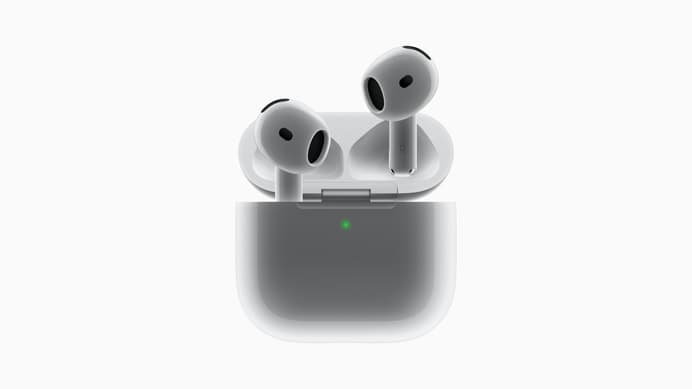
Can AirPods cause tinnitus? The direct answer
AirPods cannot give you tinnitus by sitting in your ear. What causes noise-induced tinnitus is sound energy over time - the combination of level and duration - and that is true whether the source is an earbud, a pair of over-ears, a nightclub or a power tool.
Where earbuds do carry extra risk is behavioural, not technical:
- The driver sits close to the eardrum, so a given volume setting delivers more energy than the same setting on a speaker.
- People compensate for background noise. On a train or a busy street, listeners routinely push past 90 dB without noticing, because the reference point is the noise around them.
- Duration creeps. Earbuds are comfortable enough to wear for hours, and eight hours at a moderate volume can carry more total exposure than twenty minutes at a loud one.
The WHO's safe listening guidance works on roughly 80 dB for 40 hours a week, with the safe duration halving for every 3 dB increase. At 92 dB - an ordinary "loud enough to enjoy it on the bus" level - you are down to well under three hours a week.
The warning sign people ignore
If your ears ring, buzz or feel muffled after listening, that is a temporary threshold shift. It usually resolves within a few hours, which is exactly why it gets dismissed. It should not be. It means the volume was loud enough to fatigue your inner ear, and repeated episodes are strongly associated with permanent damage and lasting tinnitus.
Treat post-listening ringing as your body's volume warning, not as a normal part of using headphones.
Do AirPods make existing tinnitus worse?
This is the second most common question we get, and the answer is usually reassuring: not inherently. Three effects get mistaken for worsening:
- Occlusion. A silicone tip seals your ear canal and blocks outside sound. With less to mask it, your tinnitus becomes more audible. Nothing has got worse; the background just got quieter.
- Noise cancellation in quiet rooms. ANC removes the low-frequency hum you were unconsciously relying on as masking. Same illusion, stronger. This is also why silence can make tinnitus feel worse.
- Pressure sensation. Some people perceive a suction-like feeling with ANC. It is uncomfortable and worth switching to transparency for, but there is no evidence it damages hearing.
Genuine worsening comes from the same place as genuine causation: volume. If you have tinnitus, the practical rule is to use transparency mode in quiet environments and save ANC for genuinely loud ones - where it is protective, because it removes the need to crank the volume.
Where AirPods actually help: the hearing health features
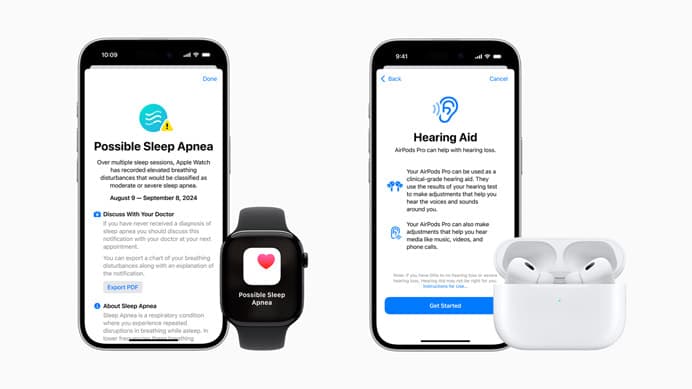
Since iOS 18, AirPods Pro 2 and later ship with three linked hearing features, and in supported regions the hearing aid function is authorised as over-the-counter hearing aid software rather than a wellness gimmick.
The hearing test
A five-minute pure-tone test run from the iPhone, producing an audiogram stored in the Health app. It is not a replacement for an audiologist - it will not investigate why you have hearing loss, which is the part that matters clinically - but as a way to find out whether you have hearing loss at all, for free, in your own home, it is genuinely valuable.
This matters for tinnitus more than people realise. Most chronic tinnitus sits alongside some degree of hearing loss, and a large share of people with it have never been tested.
Hearing aid mode
If the test finds mild to moderate loss, the AirPods can amplify to your personal profile. This is not a tinnitus treatment - but treating hearing loss is one of the more reliable ways to reduce tinnitus intrusiveness, because restoring the input your brain is missing reduces the compensatory activity that drives the phantom sound. Read more in our guide to hearing aids and tinnitus.
Hearing protection and exposure tracking
The Health app logs your Headphone Audio Levels over seven days and flags when you exceed safe exposure. Combined with Settings > Sounds & Haptics > Headphone Safety > Reduce Loud Audio, this is the single most useful tinnitus-prevention tool on the phone, and almost nobody turns it on.
Using AirPods safely when you have tinnitus
- Set a hard volume ceiling. Headphone Safety > Reduce Loud Audio, capped at 80 dB. Set it once and forget it.
- Check your seven-day exposure. Health app > Hearing. If you are regularly in the yellow, the problem is not which earbuds you own.
- Take the hearing test. Free, five minutes, and it tells you whether hearing loss is part of your tinnitus picture.
- Use ANC where it protects you, transparency where it does not. Loud commute: ANC on. Quiet bedroom: transparency, or nothing at all.
- Follow the 60/60 habit. Roughly 60% volume, 60 minutes, then a break.
- For masking at night, prefer a speaker. All-night in-ear use irritates the ear canal. A pillow speaker playing white noise or water sounds does the job better - see our tinnitus app comparison for what to play through it.
What the volume numbers actually mean
"Keep it under 80 dB" is easy to say and hard to picture, so it helps to know what the scale is doing. Sound level is logarithmic, which means the safe listening time does not shrink gently as you turn things up - it collapses.
| Level | Roughly like | Safe listening time per week |
|---|---|---|
| 75 dB | Busy office | Effectively unlimited |
| 80 dB | Loud restaurant | About 40 hours |
| 86 dB | City traffic from a bus | About 10 hours |
| 92 dB | Comfortable on a train | Under 3 hours |
| 98 dB | Motorbike, loud gig | Under 1 hour |
The line that catches most people is 92 dB. That is not an unreasonable-sounding volume; it is roughly what you land on when you turn music up enough to enjoy it over train noise. Two commutes a day puts you past a week's safe exposure by Wednesday.
This is also why transparency mode and noise cancellation matter for prevention rather than comfort. Both let you hear your audio without competing against the background, so the volume you choose is lower. On a noisy commute, ANC is genuinely protective for exactly this reason.
If you think the damage is already done
Ringing that has been present for months is not something you can undo by changing settings, and no headphone feature reverses hair-cell loss. But two things are still worth doing rather than assuming it is too late.
Get your hearing tested properly, because untreated hearing loss keeps driving tinnitus and is the part that responds to treatment. And protect what remains: the strongest predictor of how bad this gets is total exposure from here, not what has already happened. People who take that seriously often find the tinnitus stops getting worse, and habituation does the rest of the work over the following months.
When to stop troubleshooting and see someone
Book an appointment rather than adjusting settings if your tinnitus is new and in one ear only, pulses in time with your heartbeat, arrives with sudden hearing loss or dizziness, or follows a single loud exposure and has not settled within a few days. Sudden hearing loss in particular is treated as a medical urgency - the treatment window is measured in days.
The bottom line
AirPods are neither the villain nor the cure. As a cause, they are only as risky as the volume you choose, and the ringing-after-listening warning sign is the one thing worth taking seriously. As a help, the hearing test and hearing aid mode are a real step forward - not because they treat tinnitus, but because they make finding and treating hearing loss cheap and unintimidating, and that is the intervention with the better track record.
If you want to go further, start with managing tinnitus, or protect what you have with our guide to noise-cancelling headphones and tinnitus.
Frequently Asked Questions
Can AirPods cause tinnitus?
AirPods themselves do not cause tinnitus - volume and listening duration do. Any headphone played loudly enough for long enough can damage the hair cells in your inner ear and trigger tinnitus, and earbuds make that easier because the sound source sits close to the eardrum and people tend to turn them up to overcome background noise. Used below roughly 80 dB with regular breaks, AirPods are not a meaningful tinnitus risk.
Why do my ears ring after wearing AirPods?
Temporary ringing after listening is called a temporary threshold shift, and it is a warning sign rather than something harmless. It means the volume was high enough to fatigue your inner ear. It usually fades within hours, but repeated episodes are associated with permanent hearing damage and lasting tinnitus. If it happens, lower your volume substantially and check your headphone audio levels in the iPhone Health app.
Do AirPods make existing tinnitus worse?
Not inherently. Two things commonly confuse people: sealing your ear canal with a tip blocks outside sound, which makes existing tinnitus more noticeable, and noise cancellation in an already quiet room does the same. Neither is causing damage. Actual worsening comes from volume, so if you have tinnitus, keep levels low and prefer transparency mode in quiet spaces.
Can AirPods Pro be used as a hearing aid for tinnitus?
AirPods Pro 2 and later can act as an over-the-counter hearing aid in supported regions, using a personalised profile from the built-in hearing test. That is a hearing loss feature, not a tinnitus treatment - but because untreated hearing loss is one of the biggest drivers of tinnitus, amplifying what you are missing often makes tinnitus less prominent as a side effect.
What volume is safe for AirPods if I have tinnitus?
Aim to stay under about 80 dB, which the iPhone Health app tracks for you under Headphone Audio Levels. A practical rule: if you cannot hear someone speaking at arm's length, it is too loud. Turn on Settings > Sounds & Haptics > Headphone Safety > Reduce Loud Audio and set a ceiling, and take a listening break every hour.
References
- Tinnitus - causes, prevention and treatment - NIDCD, National Institutes of Health
- Deafness and hearing loss - safe listening - World Health Organization
- Use hearing health features with AirPods Pro 2 or AirPods Pro 3 - Apple Support
- Customize headphone audio levels on your iPhone or iPad - Apple Support
- Noise-induced hearing loss - NIDCD, National Institutes of Health
 Written by